> ## Documentation Index
> Fetch the complete documentation index at: https://docs.fieldiu.com/llms.txt
> Use this file to discover all available pages before exploring further.
# Invoice Settings
> ### 💡 Invoice Settings
>
> The main idea behind invoice settings is to configure your preferences for invoices. For example, you can choose whether or not to print a proforma invoice, specify how you want the proforma invoice to be named, and customize other related options.
### 1. Access
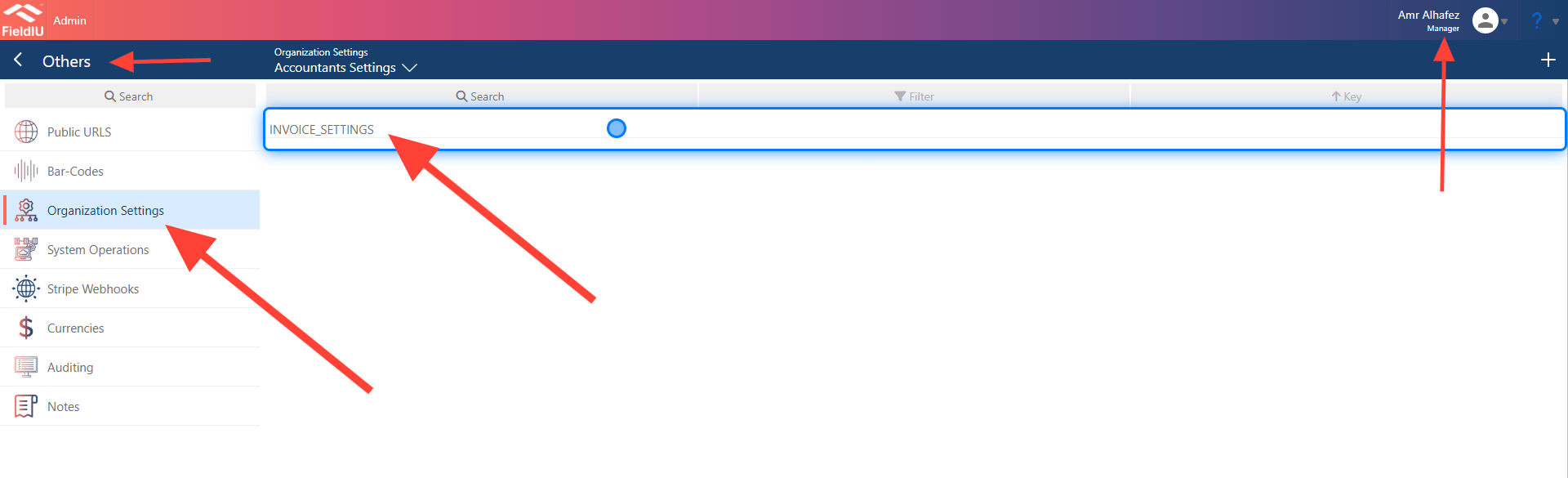
To access the Invoice Settings, open the Manager app, then from the side menu, select "Other," followed by "Organization Settings," and finally "Invoice Settings."
 ### 2. Invoice Settings Main Screen
The Invoice Settings have two sections. The right section is for the settings, and all our work will be done in this settings section.
### 2. Invoice Settings Main Screen
The Invoice Settings have two sections. The right section is for the settings, and all our work will be done in this settings section.
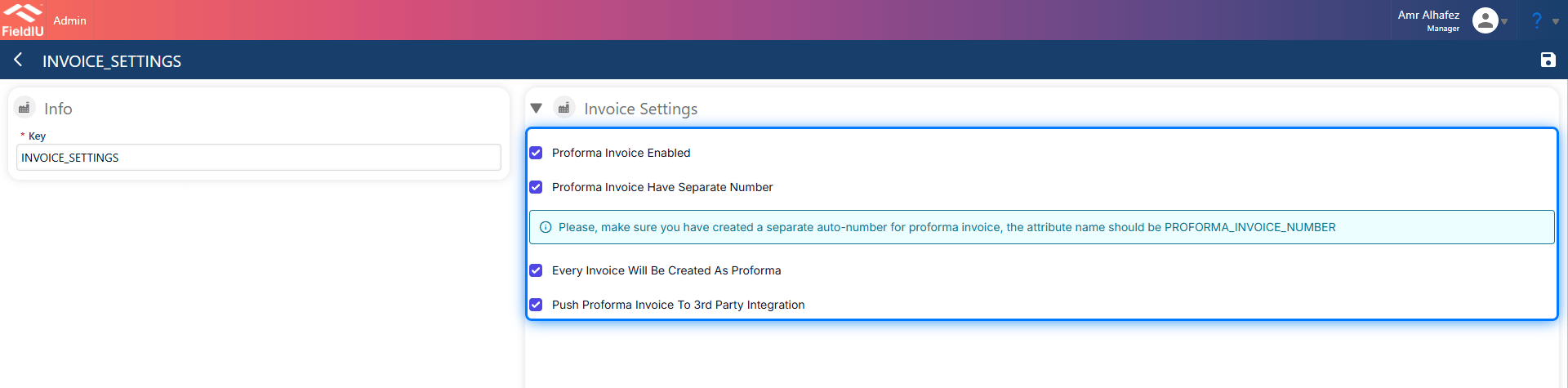 > ### ⚠️ DON'T CHANGE KEY VALUE
>
> Once you change the key value, the settings will not be effective.
### 3. Invoice Settings
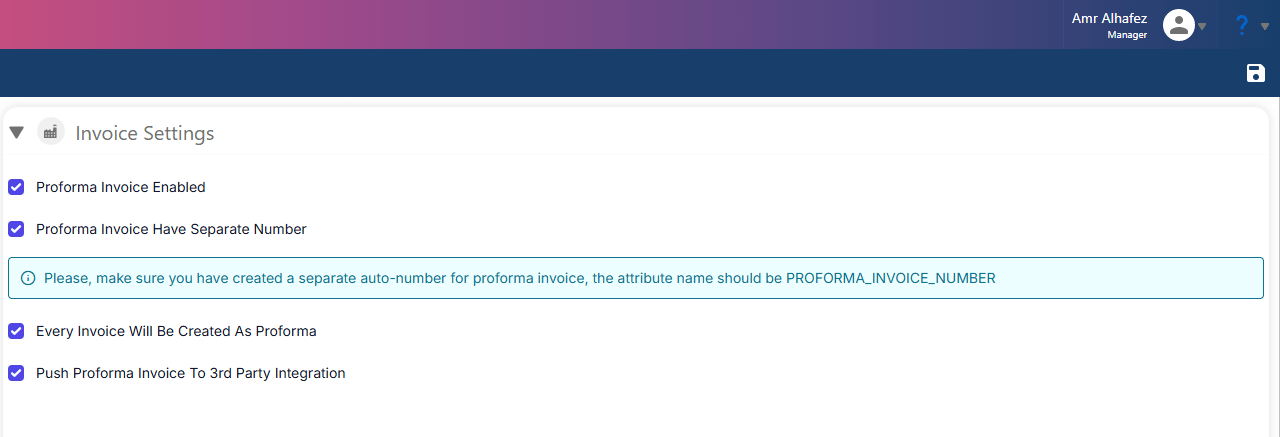
In the Invoice Settings section, we have 4 selectors:
* **Proforma invoice Enabled** : If you want a proforma invoice in the system, you must select this option.
* **Proforma invoice Have separate Number** : If this option is selected and a proforma invoice is created, it will take a separate name. When it’s converted to a tax invoice, it will take the original number sequence.
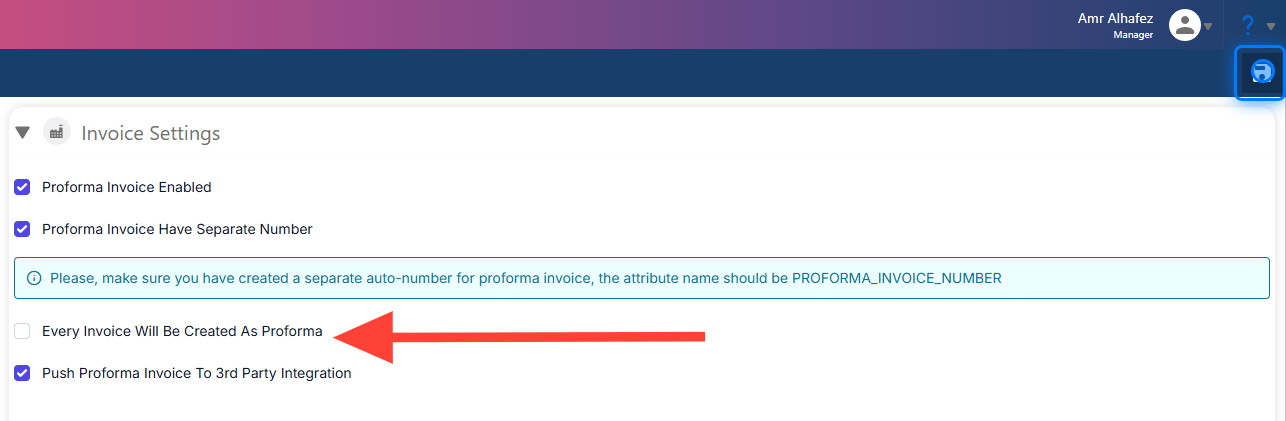
* **Every Invoice Will Be Created As Proforma** : If this is on, every time you create an invoice, it will first be a proforma invoice, and then you’ll need to change it to a tax invoice. If it’s off, the system will ask you whether you want to create a proforma invoice first or directly create a tax invoice.
* **Push Proforma Invoice To 3rd Integration** : If you have any integration with a 3rd-party software for invoices, the proforma invoice will be sent to it if this option is selected.
> ### ⚠️ DON'T CHANGE KEY VALUE
>
> Once you change the key value, the settings will not be effective.
### 3. Invoice Settings
In the Invoice Settings section, we have 4 selectors:
* **Proforma invoice Enabled** : If you want a proforma invoice in the system, you must select this option.
* **Proforma invoice Have separate Number** : If this option is selected and a proforma invoice is created, it will take a separate name. When it’s converted to a tax invoice, it will take the original number sequence.
* **Every Invoice Will Be Created As Proforma** : If this is on, every time you create an invoice, it will first be a proforma invoice, and then you’ll need to change it to a tax invoice. If it’s off, the system will ask you whether you want to create a proforma invoice first or directly create a tax invoice.
* **Push Proforma Invoice To 3rd Integration** : If you have any integration with a 3rd-party software for invoices, the proforma invoice will be sent to it if this option is selected.
 ### 4. Example
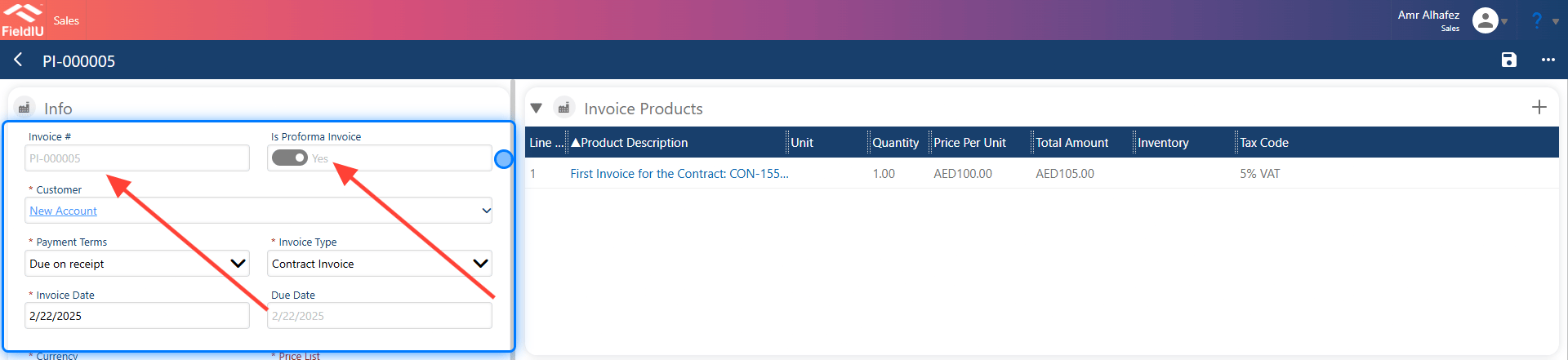
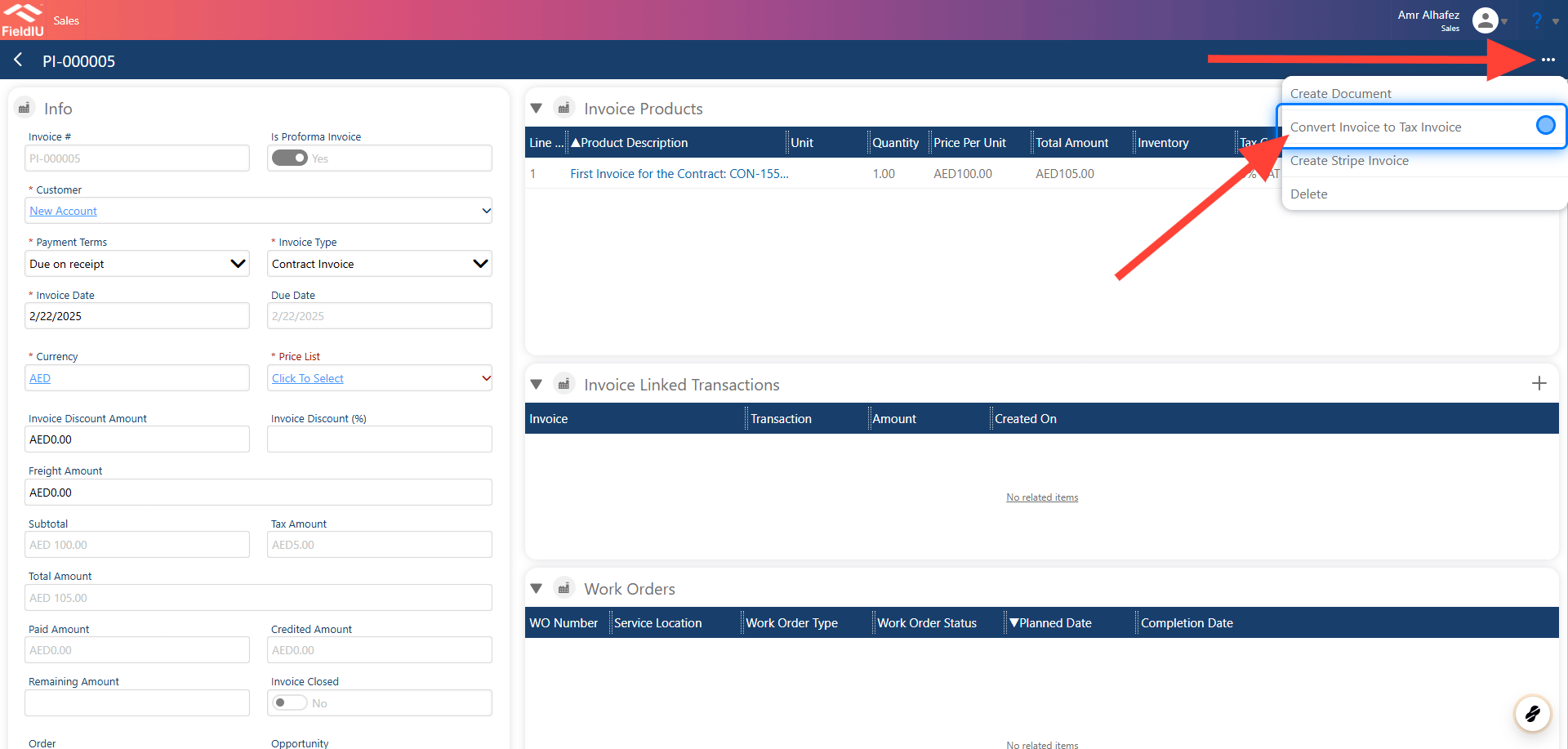
In this example, we have selected the settings: **Proforma invoice Enabled** & **Proforma invoice Have separate Number** .
As you can see, the "Proforma invoice" button is selected as "Yes," and the invoice number starts with "PI-" to refer to the proforma invoice.
### 4. Example
In this example, we have selected the settings: **Proforma invoice Enabled** & **Proforma invoice Have separate Number** .
As you can see, the "Proforma invoice" button is selected as "Yes," and the invoice number starts with "PI-" to refer to the proforma invoice.
 ### 5. Converting Invoice to Tax Invoice
By clicking on the 3 dots button and selecting **Convert Invoice to Tax Invoice** , it will convert the proforma invoice to a tax invoice.
### 5. Converting Invoice to Tax Invoice
By clicking on the 3 dots button and selecting **Convert Invoice to Tax Invoice** , it will convert the proforma invoice to a tax invoice.
 ### 6. Example
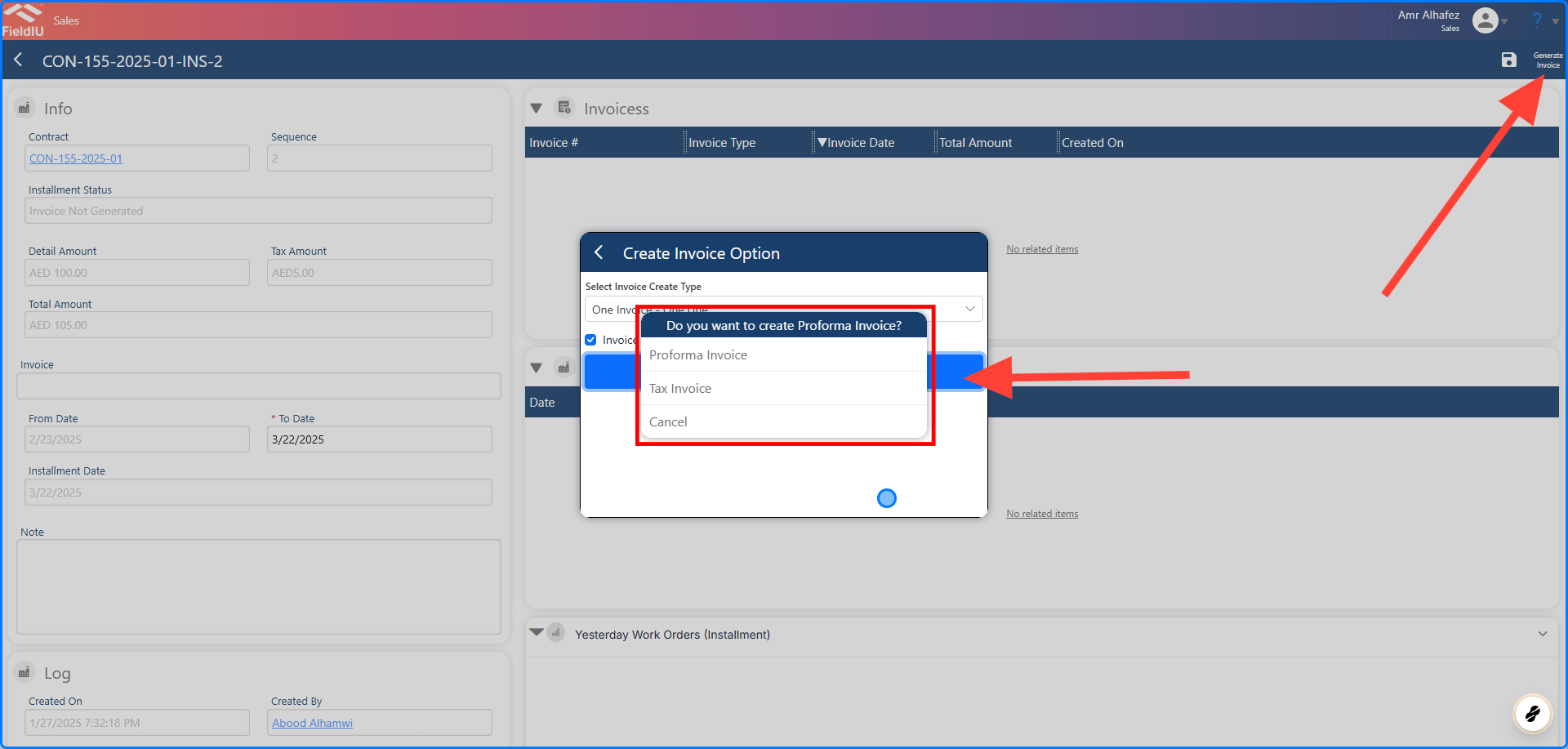
Let’s see what will happen if we do not select **Every Invoice Will Be Created As Proforma** . In this case, the system will prompt you to choose the type of invoice you want to create. It will ask whether you want to create a proforma invoice first or directly create a tax invoice.
### 6. Example
Let’s see what will happen if we do not select **Every Invoice Will Be Created As Proforma** . In this case, the system will prompt you to choose the type of invoice you want to create. It will ask whether you want to create a proforma invoice first or directly create a tax invoice.
 ### 7. Choosing the Invoice Type During Generation
It will ask for the invoice type once we start generating it, giving you the option to choose between creating a proforma invoice or a tax invoice.
### 7. Choosing the Invoice Type During Generation
It will ask for the invoice type once we start generating it, giving you the option to choose between creating a proforma invoice or a tax invoice.
 ### 8. Example
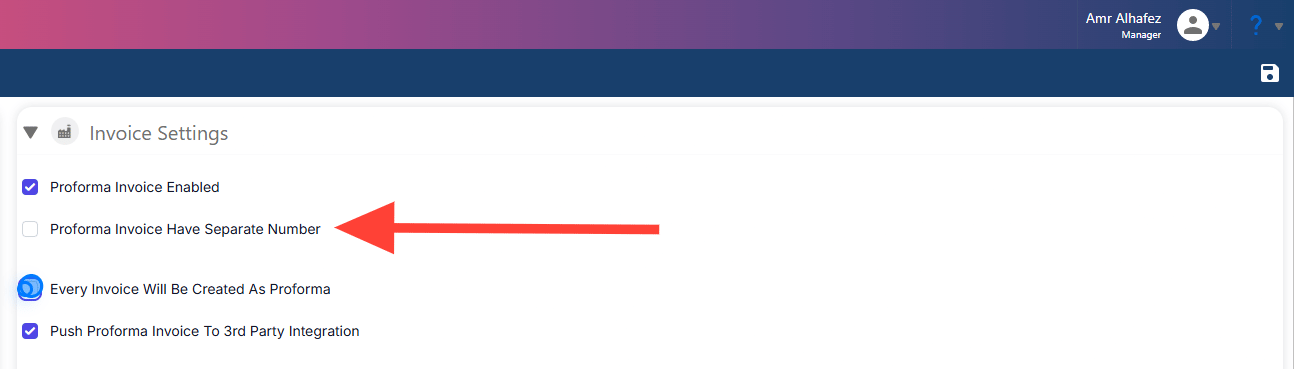
Let’s see what will happen if we do not select **Proforma invoice Have separate Number** . In this case, the system will assign the proforma invoice number the same sequence as the tax invoice number.
### 8. Example
Let’s see what will happen if we do not select **Proforma invoice Have separate Number** . In this case, the system will assign the proforma invoice number the same sequence as the tax invoice number.
 ### 9. Invoice Number
As you can see, the invoice number does not start with "PI." It is taking the tax invoice number sequence directly, even though it is a proforma invoice.
### 9. Invoice Number
As you can see, the invoice number does not start with "PI." It is taking the tax invoice number sequence directly, even though it is a proforma invoice.
 �����������������������